
IRIS A2A E-Filing:
Authentication Setup Roadmap
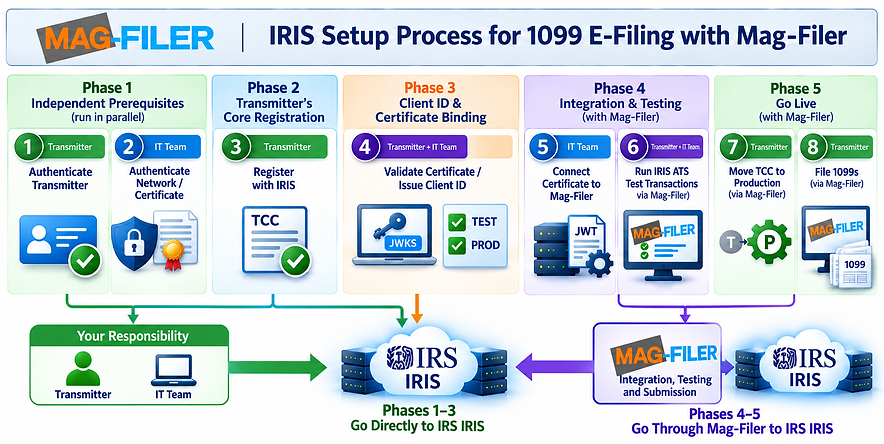
For IRIS Application-to-Application (A2A) e-filing, the IRS requires additional steps to authenticate both the Transmitter and the Transmitter's network. These steps involve your Network/IT team and can take up to 45 days to complete before your systems connect directly to the IRIS platform.
Mag-Filer has already met all requirements to submit on your behalf through our Secure Virtual Transmitter Portal, included in your Mag-Filer package — bypassing nearly all the steps below. Your Mag-Filer software can transmit through either path, so if you run into any snags along the way, you're covered.

Prerequisite
Mag-Filer
Mag-Filer already holds a Software Developer TCC and has passed IRS ATS testing for its software package. This is one-time work Mag-Filer performs independently, not tied to any specific Transmitter client.
Reference: Publication 5719 – IRIS Test Package
Phase 1
Independent Prerequisites (run in parallel)
1. Transmitter — Authenticate Transmitter
Register and verify identity through e-Services (ID.me) for the firm's Responsible Officials.
Reference: e-Services
2. IT Team — Authenticate Network with a Trusted Certificate Authority
Obtain, or confirm you already have, a CA-issued X.509 certificate. An existing MeF or AIR certificate may be reused.
Reference: Publication 5718


Phase 2
Transmitter's Core Registration
3. Transmitter — Register with IRIS
Submit the IRIS Application for TCC, selecting the Transmitter role. One TCC covers all issuers and form types, so there is no need to reapply per business. Allow up to 45 days for approval; the TCC is issued in Test ("T") status.
Reference: IRIS Application for TCC
Phase 3
Client ID and Certificate Binding
4. Transmitter + IT Team — Validate the Certificate and Issue a Client ID
Once the TCC is issued, complete the API Client ID Application. The IT team builds a JSON Web Key Set (JWKS) from the certificate and uploads it for validation; the Client ID is issued once the JWKS is accepted.
Reference: Get an API Client ID
5. Transmitter — Authorize the Client ID for Test and Production
Log into the IRS Consent App under the organization tied to the TCC, enter the IRIS Client ID, and grant it access to TEST and PROD. This is what links the Client ID to the Transmitter's TCC/UserID.
Reference: A2A Consent App

Phase 4
Integration and Testing
6. IT Team — Share Certificate Details with Mag-Filer
Implement the OAuth JWT-bearer flow — signing a Client JWT and a User JWT with the private key matching the uploaded certificate, with the "kid" matching exactly — and wire this into Mag-Filer's software and API calls.
Reference: Publication 5718 (A2A Specifications)
7. Transmitter + IT Team — Run Test Transactions
Complete the required Communication Testing in the IRIS ATS (test) environment, using the TCC's Test status and the Client ID's TEST grant.
Reference: IRIS Assurance Testing System (ATS)

Phase 5
Go Live
8. Transmitter — Switch the TCC to Production Status
Once testing passes, contact the IRS Help Desk to request that the TCC be moved from Test ("T") to Production ("P") status.
Reference: IRIS — E-file Information Returns
9. Transmitter — File 1099s
Import, print, and e-file through Mag-Filer's software, now authenticated using the IT team's certificate and Client ID.
Reference: Mag-Filer.com

The Secure Virtual Transmitter Portal - Option
If any of the steps above stall or run into snags, Mag-Filer maintains a Secure Virtual Transmitter Portal, included in your Mag-Filer package. Flipping one switch routes your e-filing through this portal instead — bypassing the TCC, Client ID, and certificate setup entirely.
Given how much can go wrong in the IRS authentication process, treat this as either your primary path (skip the hassle) or your fallback when a deadline is close and you need a second route to get filings out on time.
Mag-Filer - your secure choice in IRS E-Filing
